
1.2.0.04537.7 MB
MIT
strict
core22
A lightweight cross-platform IP scanner
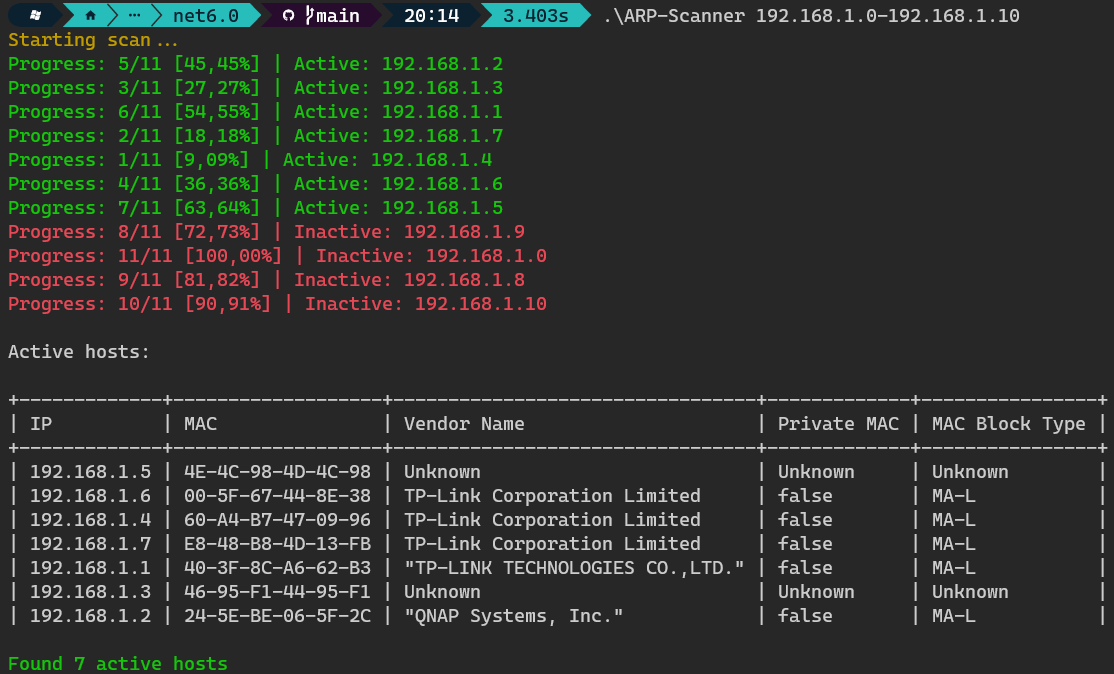
Usage
1. Download & install the latest release
- Chocolatey (Windows):
- Snapcraft (Linux):
- GitHub (Windows/Linux): releases (https://github.com/Stone-Red-Code/ARP-Scanner/releases)
2. Use the
-
-
-
-
-
> Note: This programm may not work on all linux distributions because the ArpLookup (https://github.com/georg-jung/ArpLookup) library has some limitations (https://github.com/georg-jung/ArpLookup#supported-platforms)
Third party licenses
- ArpLookup (https://github.com/georg-jung/ArpLookup) - MIT (https://github.com/georg-jung/ArpLookup/blob/master/LICENSE.txt)
- IPAddressRange (https://github.com/jsakamoto/ipaddressrange) - MPL-2.0 (https://github.com/jsakamoto/ipaddressrange/blob/master/LICENSE)
- Humanizer (https://github.com/Humanizr/Humanizer) - MIT (https://github.com/Humanizr/Humanizer/blob/main/license.txt)
1. Download & install the latest release
- Chocolatey (Windows):
choco install arp-scanner- Snapcraft (Linux):
snap install arp-scanner- GitHub (Windows/Linux): releases (https://github.com/Stone-Red-Code/ARP-Scanner/releases)
2. Use the
arp-scanner command-
arp-scanner help lists all available commands-
arp-scanner scan scans the network for devices-
arp-scanner scan --help lists all available options for the scan command-
arp-scanner monitor continuously scans the network for devices-
arp-scanner monitor --help lists all available options for the monitor command> Note: This programm may not work on all linux distributions because the ArpLookup (https://github.com/georg-jung/ArpLookup) library has some limitations (https://github.com/georg-jung/ArpLookup#supported-platforms)
Third party licenses
- ArpLookup (https://github.com/georg-jung/ArpLookup) - MIT (https://github.com/georg-jung/ArpLookup/blob/master/LICENSE.txt)
- IPAddressRange (https://github.com/jsakamoto/ipaddressrange) - MPL-2.0 (https://github.com/jsakamoto/ipaddressrange/blob/master/LICENSE)
- Humanizer (https://github.com/Humanizr/Humanizer) - MIT (https://github.com/Humanizr/Humanizer/blob/main/license.txt)
Update History
1.1.0.20250627 (40) → 1.2.0.0 (45)23 Jan 2026, 00:17 UTC
1.1.0.20250627 (40)13 Dec 2025, 09:47 UTC
15 Dec 2023, 21:57 UTC
22 Jan 2026, 20:55 UTC
13 Dec 2025, 09:47 UTC