
6.3.0-9.7.0-b001-31148593.8 MB
GPL-3.0
strict
core22
Domotz Network monitoring
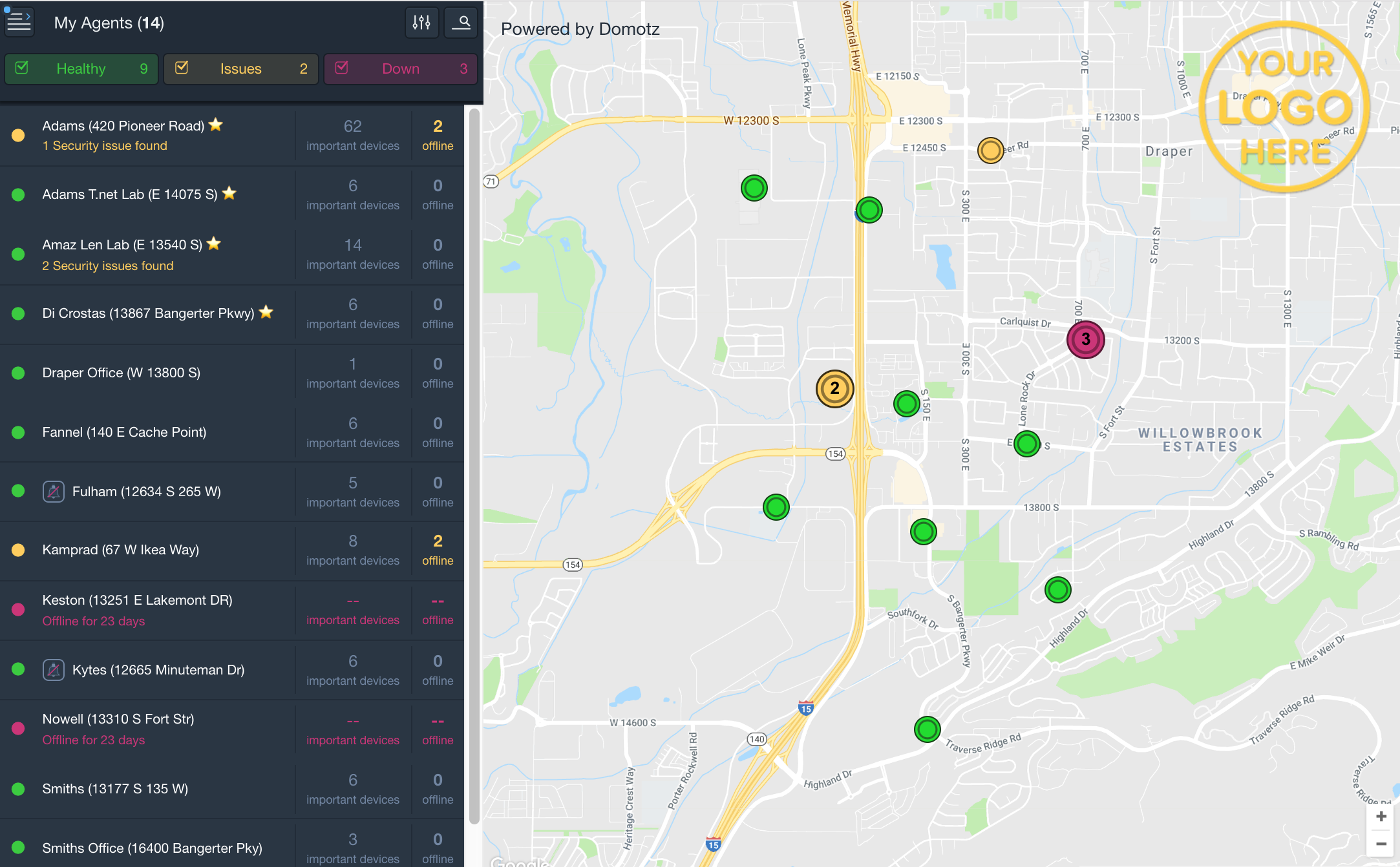


Domotz Network Monitoring and Management
Domotz is a cloud-based platform that helps you discover, monitor, and
manage your network and connected devices without overspending. With
full-context visibility and powerful management tools, Domotz helps you
eliminate blind spots, resolve issues faster, and exceed service
expectations.
Subscription Requirement\
Domotz requires a subscription as described at http://www.domotz.com/. View transparent pricing at http://www.domotz.com/pricing.
Why Domotz?
Today's networks are complex, distributed, and packed with connected
devices. Without proper monitoring, IT teams are left reacting to
issues, wasting time troubleshooting blind spots, and putting out fires.
Domotz gives you complete visibility into every device and connection.
With features like real-time alerts, remote access, and visual network
topology, you can quickly identify and resolve problems, often before
anyone notices.
Spend less time in crisis mode and more time ensuring stability and
satisfaction.
Try Domotz for free and access the full feature set:
- Device Discovery & Inventory\
Automatically identifies all connected devices and builds a
comprehensive inventory.
- Network Topology Mapping\
Visualizes how devices are connected for easier navigation and faster
troubleshooting.
- Real-Time Alerts\
Notifies you when devices go offline, new ones connect, or performance
degrades.
- Remote Access\
Securely connect to devices using HTTP, SSH, RDP, Telnet---no open
ports needed.
- Power Management\
Power cycle devices remotely using PoE switches, PDUs, or Wake-on-LAN.
- SNMP & TCP Monitoring\
Monitor SNMP metrics and TCP services for deeper insights.
- Custom Scripting\
Automate tasks or trigger actions using customizable scripts.
- Configuration Management\
Backup and restore device configurations to streamline recovery and
consistency.
- Network Diagnostics\
Includes tools like traceroute, latency tracking, DHCP monitoring,
bufferbloat, bandwidth analysis, and speed tests.
- Camera Access (ONVIF)\
Stream or capture snapshots from IP cameras---no reconfiguring
firewalls.
Why Domotz Stands Out
- Accessible\
Agentless deployment in under 15 minutes. Easy to evaluate, implement,
and maintain at an affordable price.
- Deeper Discovery\
Combines Layer-2 and Layer 3 scanning for more accurate device
identification and visibility.
- True Management\
Go beyond monitoring with robust management tools and a custom
scripting framework.
- Centralized Dashboard\
Manage all your networks and devices from a single, unified
interface---anywhere in the world.
- Built for Security\
ISO/IEC 27001 and SOC 2 Type II certified. Domotz uses strict
controls, encrypted communications, and continuous monitoring to
protect your data.
Installation notes
Please connect the following interfaces:
Then, click on the Domotz icon or go to http://127.0.0.1:3000 to configure the Domotz Collector. Note: if TCP port 3000 has been already used by a different service, Collector Web Interface might be available on subsequent ports (e.g. http://127.0.0.1:3001, http://127.0.0.1:3002, etc)
Additional notes
In case you want to use the VPN on demand feature, you have to execute also:
In case Uncomplicated Firewall (UFW) is configured on your machine, you might consider allowing the usage of the port where the Collector Web Interface is available. For instance running the following command:
Domotz is a cloud-based platform that helps you discover, monitor, and
manage your network and connected devices without overspending. With
full-context visibility and powerful management tools, Domotz helps you
eliminate blind spots, resolve issues faster, and exceed service
expectations.
Subscription Requirement\
Domotz requires a subscription as described at http://www.domotz.com/. View transparent pricing at http://www.domotz.com/pricing.
Why Domotz?
Today's networks are complex, distributed, and packed with connected
devices. Without proper monitoring, IT teams are left reacting to
issues, wasting time troubleshooting blind spots, and putting out fires.
Domotz gives you complete visibility into every device and connection.
With features like real-time alerts, remote access, and visual network
topology, you can quickly identify and resolve problems, often before
anyone notices.
Spend less time in crisis mode and more time ensuring stability and
satisfaction.
Try Domotz for free and access the full feature set:
- Device Discovery & Inventory\
Automatically identifies all connected devices and builds a
comprehensive inventory.
- Network Topology Mapping\
Visualizes how devices are connected for easier navigation and faster
troubleshooting.
- Real-Time Alerts\
Notifies you when devices go offline, new ones connect, or performance
degrades.
- Remote Access\
Securely connect to devices using HTTP, SSH, RDP, Telnet---no open
ports needed.
- Power Management\
Power cycle devices remotely using PoE switches, PDUs, or Wake-on-LAN.
- SNMP & TCP Monitoring\
Monitor SNMP metrics and TCP services for deeper insights.
- Custom Scripting\
Automate tasks or trigger actions using customizable scripts.
- Configuration Management\
Backup and restore device configurations to streamline recovery and
consistency.
- Network Diagnostics\
Includes tools like traceroute, latency tracking, DHCP monitoring,
bufferbloat, bandwidth analysis, and speed tests.
- Camera Access (ONVIF)\
Stream or capture snapshots from IP cameras---no reconfiguring
firewalls.
Why Domotz Stands Out
- Accessible\
Agentless deployment in under 15 minutes. Easy to evaluate, implement,
and maintain at an affordable price.
- Deeper Discovery\
Combines Layer-2 and Layer 3 scanning for more accurate device
identification and visibility.
- True Management\
Go beyond monitoring with robust management tools and a custom
scripting framework.
- Centralized Dashboard\
Manage all your networks and devices from a single, unified
interface---anywhere in the world.
- Built for Security\
ISO/IEC 27001 and SOC 2 Type II certified. Domotz uses strict
controls, encrypted communications, and continuous monitoring to
protect your data.
Installation notes
Please connect the following interfaces:
- sudo snap connect domotzpro-agent-publicstore:firewall-control
- sudo snap connect domotzpro-agent-publicstore:network-observe
- sudo snap connect domotzpro-agent-publicstore:raw-usb
- sudo snap connect domotzpro-agent-publicstore:shutdown
- sudo snap connect domotzpro-agent-publicstore:system-observe
Then, click on the Domotz icon or go to http://127.0.0.1:3000 to configure the Domotz Collector. Note: if TCP port 3000 has been already used by a different service, Collector Web Interface might be available on subsequent ports (e.g. http://127.0.0.1:3001, http://127.0.0.1:3002, etc)
Additional notes
In case you want to use the VPN on demand feature, you have to execute also:
- sudo sh -c 'echo tun >> /etc/modules'
- sudo modprobe tun
In case Uncomplicated Firewall (UFW) is configured on your machine, you might consider allowing the usage of the port where the Collector Web Interface is available. For instance running the following command:
- sudo ufw allow 3000
Update History
6.3.0-9.6.0-b001-310 (482) → 6.3.0-9.7.0-b001-311 (485)21 Oct 2026, 13:15 UTC
6.3.0-9.5.0-b001-309 (481) → 6.3.0-9.6.0-b001-310 (482)13 Oct 2026, 08:02 UTC
6.3.0-9.4.1-b001-305 (476) → 6.3.0-9.5.0-b001-309 (481)29 Sept 2026, 08:15 UTC
6.1.0-9.2.0-b001-301 (473) → 6.3.0-9.4.1-b001-305 (476)21 Sept 2026, 12:45 UTC
6.1.0-9.1.0-b001-297 (470) → 6.1.0-9.2.0-b001-301 (473)2 Sept 2026, 15:30 UTC
6.0.0-9.0.0-b001-296 (467) → 6.1.0-9.1.0-b001-297 (470)25 Aug 2026, 09:30 UTC
5.2.0-8.8.1-b001-291 (461) → 6.0.0-9.0.0-b001-296 (467)17 Aug 2026, 12:45 UTC
5.1.0-8.7.3-b001-289 (455) → 5.2.0-8.8.1-b001-291 (461)15 Jul 2026, 12:00 UTC
5.1.0-8.7.2-b001-283 (452) → 5.1.0-8.7.3-b001-289 (455)7 Jul 2026, 11:45 UTC
5.1.0-8.6.0-b001-277 (449) → 5.1.0-8.7.2-b001-283 (452)25 Jun 2026, 10:15 UTC
5.1.0-8.5.3-b001-268 (446) → 5.1.0-8.6.0-b001-277 (449)4 Jun 2026, 13:30 UTC
5.1.0-8.5.1-b001-267 (445) → 5.1.0-8.5.3-b001-268 (446)8 May 2026, 09:15 UTC
5.0.1-8.4.0-b001-265 (440) → 5.1.0-8.5.1-b001-267 (445)30 Apr 2026, 08:30 UTC
5.0.1-8.3.3-b001-264 (439) → 5.0.1-8.4.0-b001-265 (440)16 Apr 2026, 09:00 UTC
5.0.1-8.3.2-b001-263 (436) → 5.0.1-8.3.3-b001-264 (439)7 Apr 2026, 08:13 UTC
5.0.1-8.3.1-b001-262 (433) → 5.0.1-8.3.2-b001-263 (436)30 Mar 2026, 10:37 UTC
21 Dec 2017, 15:49 UTC
20 Oct 2026, 13:46 UTC
13 Dec 2025, 09:47 UTC