1.2.31780.8 MB
GPL-3.0-or-later
strict
core18
Shadowsocks GUI with cross-platform desktop support
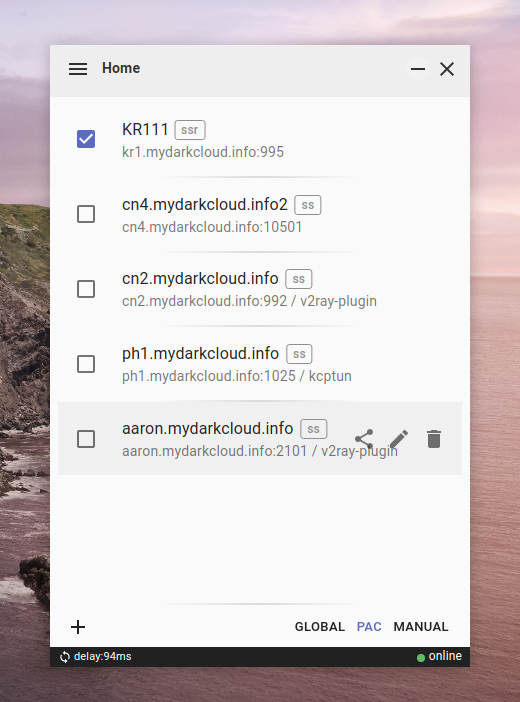


Shadowsocks Electron
> Test on Ubuntu20.4/21.04/22.04 (amd64) ● MacOS catalina (x64) ● Windows 10/11 (x64)
Shadowsocks GUI client with cross-platform desktop support powered by Electron⚛️, made specially for Linux / Windows users.
Features
➣ Supported
- _SS / SSR Protocol
- PAC Mode (GFWList)
- Global Mode (socks proxy)
- Manual Mode (no system-wide proxy set)
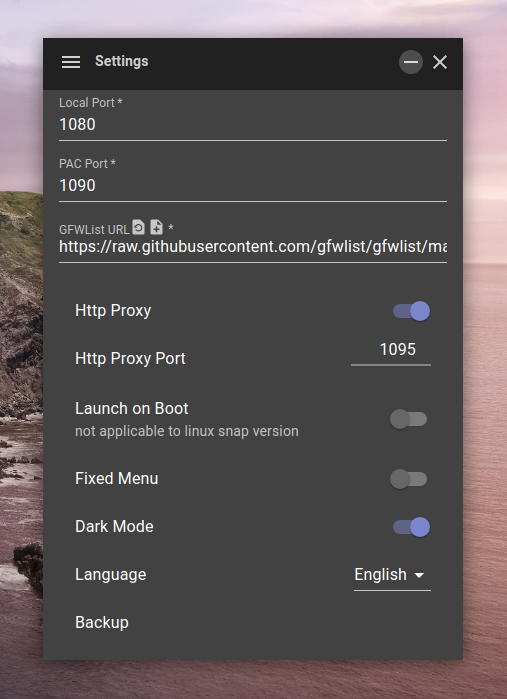
- HTTP(S) Proxy
- ACL (access control list)
- Nodes Load-Balancing Mode
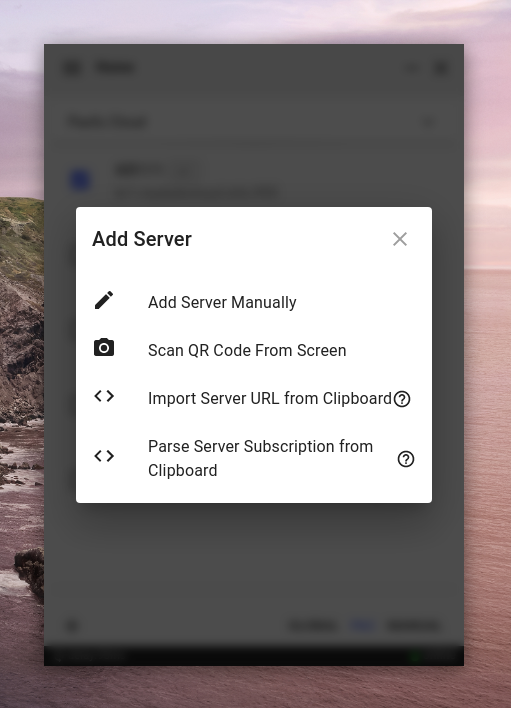
- Clipboard / QR-code Import
- Subscription Import
- Language Detecting And Switching (zh-CN / en-US)
- Configuration Backup / Recovery
- Dark / Light Mode
- Auto Start
- Server Share
- Activity Logs
➣ In Testing
- AEAD ciphers
- SIP003 plugins (v2ray & kcptun)
➣ Comming Soon
- v2ray-plugin
Supported Platforms & Arch
> More architecture will be supported if necessary, just give me an issue.
- Ubuntu
- deb
- AppImage
- snap
- MacOS
- dmg
- Windows
- exe
- zip
Downloads
- GitHub Releases
- [↪ releases page ](https://github.com/nojsja/shadowsocks-electron/releases/latest)
- ElectronJs Website
- [↪ main page ](https://www.electronjs.org/apps/shadowsocks-electron)
- Snapcraft Store (linux)
- [↪ main page ](https://snapcraft.io/shadowsocks-electron)
Plugins Downloads
> not necessary, just for some advanced users.
- kcptun
- effect: Use the plugin for ss server speed up. You must install it on you system first and enable it on ss server configuration.
- [↪ kcptun repo releases](https://github.com/shadowsocks/kcptun/releases/)
- install: Download the correct version, unpack and rename it to
- v2ray-plugin_
- effect: Use the plugin for traffic obfuscation. You must install it on you system first and enable it on ss server configuration.
- [↪ v2ray-plugin repo releases](https://github.com/shadowsocks/v2ray-plugin/releases)
- install: Download the correct version, unpack and rename it to
Recommended ACL Files
1. Download ACL file and saved it to local directory.
- go to [github repo - SuperAcl](https://github.com/Windelight/SuperACL.git)
- [inchina.acl](https://raw.githubusercontent.com/Windelight/SuperACL/master/inchina.acl): Proxy only sites blocked by the firewall.
- [inforeign.acl](https://raw.githubusercontent.com/Windelight/SuperACL/master/inforeign.acl): Proxy the sites in china which restricted access to overseas.
2. Enable ACL Mode and load the file on settings page of client.
Why?
- The official qt-version app - [
- Only [
This project was heavily inspired by [shadowsocks/ShadowsocksX-NG](https://github.com/shadowsocks/ShadowsocksX-NG), which uses local Shadowsocks-libev binary to avoid complex integration with native C code. This means it can always use the latest Shadowsocks-libev version.
It also uses Electron to bring the most powerful cross-platform desktop support with great developing experience.
Credit
- [tindy2013/shadowsocks-static-binaries](https://github.com/tindy2013/shadowsocks-static-binaries)
- [robertying/shadowsocks-electron](https://github.com/robertying/shadowsocks-electron)
- [shadowsocks/shadowsocks-libev](https://github.com/shadowsocks/shadowsocks-libev)
- [shadowsocks/ShadowsocksX-NG](https://github.com/shadowsocks/ShadowsocksX-NG)
> Test on Ubuntu20.4/21.04/22.04 (amd64) ● MacOS catalina (x64) ● Windows 10/11 (x64)
Shadowsocks GUI client with cross-platform desktop support powered by Electron⚛️, made specially for Linux / Windows users.
Features
➣ Supported
- _SS / SSR Protocol
- PAC Mode (GFWList)
- Global Mode (socks proxy)
- Manual Mode (no system-wide proxy set)
- HTTP(S) Proxy
- ACL (access control list)
- Nodes Load-Balancing Mode
- Clipboard / QR-code Import
- Subscription Import
- Language Detecting And Switching (zh-CN / en-US)
- Configuration Backup / Recovery
- Dark / Light Mode
- Auto Start
- Server Share
- Activity Logs
➣ In Testing
- AEAD ciphers
- SIP003 plugins (v2ray & kcptun)
➣ Comming Soon
- v2ray-plugin
Supported Platforms & Arch
> More architecture will be supported if necessary, just give me an issue.
- Ubuntu
- deb
x64/x86/arm64- AppImage
x64/x86/arm64- snap
x64- MacOS
- dmg
x64- Windows
- exe
x64- zip
x64/x86Downloads
- GitHub Releases
- [↪ releases page ](https://github.com/nojsja/shadowsocks-electron/releases/latest)
- ElectronJs Website
- [↪ main page ](https://www.electronjs.org/apps/shadowsocks-electron)
- Snapcraft Store (linux)
- [↪ main page ](https://snapcraft.io/shadowsocks-electron)
Plugins Downloads
> not necessary, just for some advanced users.
- kcptun
- effect: Use the plugin for ss server speed up. You must install it on you system first and enable it on ss server configuration.
- [↪ kcptun repo releases](https://github.com/shadowsocks/kcptun/releases/)
- install: Download the correct version, unpack and rename it to
kcptun, then put the file into system dir (such as /usr/local/bin/) on unix like systems. OR you may need to configure system variables on windows.- v2ray-plugin_
- effect: Use the plugin for traffic obfuscation. You must install it on you system first and enable it on ss server configuration.
- [↪ v2ray-plugin repo releases](https://github.com/shadowsocks/v2ray-plugin/releases)
- install: Download the correct version, unpack and rename it to
v2ray-plugin, then put the file into system dir (such as /usr/local/bin/) on unix like systems. OR You may need to configure system variables on windows.Recommended ACL Files
1. Download ACL file and saved it to local directory.
- go to [github repo - SuperAcl](https://github.com/Windelight/SuperACL.git)
- [inchina.acl](https://raw.githubusercontent.com/Windelight/SuperACL/master/inchina.acl): Proxy only sites blocked by the firewall.
- [inforeign.acl](https://raw.githubusercontent.com/Windelight/SuperACL/master/inforeign.acl): Proxy the sites in china which restricted access to overseas.
2. Enable ACL Mode and load the file on settings page of client.
Why?
- The official qt-version app - [
shadowsocks-qt5](https://github.com/shadowsocks/shadowsocks-qt5) has been deprecated, which has an old interface but still working.- Only [
Shadowsocks-libev](https://github.com/shadowsocks/shadowsocks-libev) and [Shadowsocks for Android](https://github.com/shadowsocks/shadowsocks-android) support ACL (bypass China IPs, etc.)This project was heavily inspired by [shadowsocks/ShadowsocksX-NG](https://github.com/shadowsocks/ShadowsocksX-NG), which uses local Shadowsocks-libev binary to avoid complex integration with native C code. This means it can always use the latest Shadowsocks-libev version.
It also uses Electron to bring the most powerful cross-platform desktop support with great developing experience.
Credit
- [tindy2013/shadowsocks-static-binaries](https://github.com/tindy2013/shadowsocks-static-binaries)
- [robertying/shadowsocks-electron](https://github.com/robertying/shadowsocks-electron)
- [shadowsocks/shadowsocks-libev](https://github.com/shadowsocks/shadowsocks-libev)
- [shadowsocks/ShadowsocksX-NG](https://github.com/shadowsocks/ShadowsocksX-NG)
Update History
1.2.3 (17)13 Dec 2025, 09:47 UTC
30 Oct 2021, 02:56 UTC
19 Jan 2023, 13:29 UTC
13 Dec 2025, 09:47 UTC