
0.6.7-2-g20a294a3510.4 MB
GPL-3.0
strict
core22
Advanced webcam and camera controls for Linux


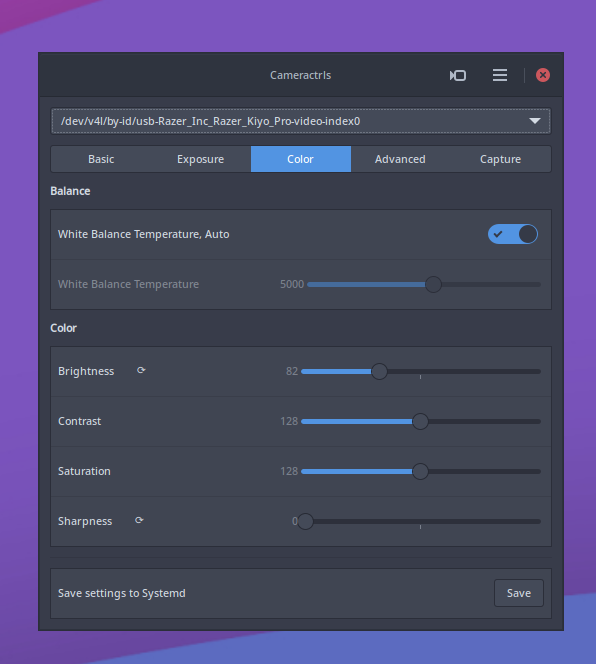

Unofficial snap for the cameractrls advanced Linux camera configuration command line and GUI tools.
To permit access to your webcam, the camera interface needs to be first connected:
To permit access to out-of-spec camera options, such as HDR mode on the Kiyo Pro, connect the raw-usb interface:
From the desktop, launching cameractrls will launch the GTK GUI version.
The cameractrls.cameractrlsgtk command is the GTK GUI while cameractrls is the command line client:
cameractrls can set the V4L2 controls and it is extendable with the non standard controls. Currently it has a Logitech extension (Led mode, led frequency, BRIO FoV), Kiyo Pro extension (HDR, HDR mode, FoV, AF mode, Save), Systemd extension (Save and restore controls with Systemd path+service).
Upstream project: https://github.com/soyersoyer/cameractrls
To permit access to your webcam, the camera interface needs to be first connected:
snap connect cameractrls:cameraTo permit access to out-of-spec camera options, such as HDR mode on the Kiyo Pro, connect the raw-usb interface:
snap connect cameractrls:raw-usbFrom the desktop, launching cameractrls will launch the GTK GUI version.
The cameractrls.cameractrlsgtk command is the GTK GUI while cameractrls is the command line client:
$ cameractrlsusage: cameractrls [--help] [-d DEVICE] [--list] [-c CONTROLS]optional arguments: -h, --help show this help message and exit -d DEVICE use DEVICE, default /dev/video0 -l, --list list the controls and values -L, --list-devices list capture devices -c CONTROLS set CONTROLS (eg.: hdr=on,fov=wide)example: cameractrls -c brightness=128,kiyoprohdr=on,kiyoprofov=widecameractrls can set the V4L2 controls and it is extendable with the non standard controls. Currently it has a Logitech extension (Led mode, led frequency, BRIO FoV), Kiyo Pro extension (HDR, HDR mode, FoV, AF mode, Save), Systemd extension (Save and restore controls with Systemd path+service).
Upstream project: https://github.com/soyersoyer/cameractrls
Update History
0.6.7-2-g20a294a (35)13 Dec 2025, 09:47 UTC
29 Nov 2022, 09:38 UTC
7 Nov 2024, 10:58 UTC
13 Dec 2025, 09:47 UTC